
In Blocks for ACF Fields, a Field Source determines where the plugin should load a field value from.
Because ACF and SCF fields can be attached to many different types of data in WordPress, the plugin needs a way to understand which context should be used when displaying a field. The Field Source setting provides that context.
For example, a field might belong to:
- the current post being edited,
- a global options page,
- a taxonomy term,
- or a user profile.
When loading a field, you first choose the Field Source, then select one of the available fields from that source. The plugin will automatically show only the fields that are relevant to the selected source, helping keep the field picker organized and context-aware.
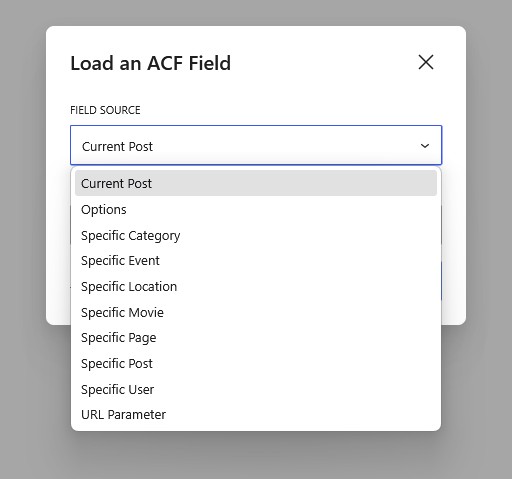
Field Sources are especially important when working with dynamic layouts in the Site Editor, Query Loops, author templates, taxonomy templates, and reusable patterns. By selecting the correct source, the same block can display different values depending on the content currently being rendered.
Unlike manually writing template code, you do not need to handle field retrieval logic yourself. Blocks for ACF Fields automatically resolves the correct field value based on the selected source and the current frontend context.
Field Source Availability
| Field Source | When it Appears | Bound to | Free Ver. | Pro Ver. |
|---|---|---|---|---|
| Current Post | Always | The post being rendered | ✔️ | ✔️ |
| Current Term | Inside Term Loops or term archive templates | The term being rendered | ✔️ | ✔️ |
| Current User | Inside User Loops or author archives | The user being rendered | ✔️ | ✔️ |
| Options | When an ACF Options Page exists | Global site options | ✔️ | ✔️ |
| Specific {post_type} | When a field group targets that post type | One specific post you choose | ❌ | ✔️ |
| Specific {taxonomy} | When a field group targets that taxonomy | One specific term you choose | ❌ | ✔️ |
| Specific User | When a field group targets users | One specific user you choose | ❌ | ✔️ |
| URL Parameter | Always | Entity decided by the URL at render time | ❌ | ✔️ |