
The Specific {post_type} source lets you load fields from a manually selected post instead of relying on the current frontend context.
Unlike the dynamic Current Post source, this source always points to one specific entry chosen manually inside the block settings. This is useful when you want a block to consistently display content from the same post regardless of where the block is rendered.
The available sources are generated automatically based on your existing field groups. For example, if you have a field group attached to the Page post type, the field source list will include Specific Page. If another field group is attached to a Product post type, the plugin will also show Specific Product.
Post types without any attached ACF or SCF field groups will not appear in the field source list. This helps keep the field loader clean and only shows sources that actually contain available fields.
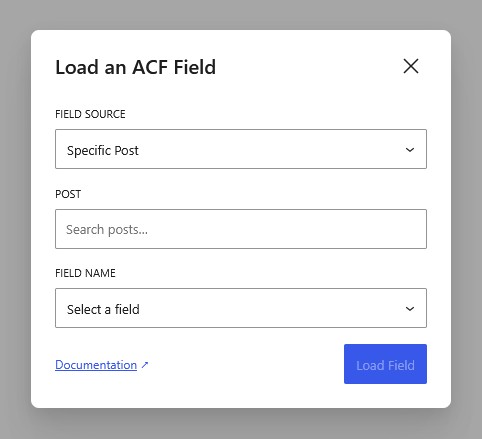
After selecting the source, you can choose the exact post you want to load fields from. The field picker will then only display fields attached to that post type.
This source is useful for:
- featured content sections,
- manually curated layouts,
- highlighted products,
- reusable banners,
- testimonial spotlights,
- and fixed-content sections that should not change dynamically.
Because the source is manually selected, it does not follow Query Loop or template context changes.