
The URL Parameter source lets a block load field values dynamically based on a query parameter in the page URL.
Instead of binding the block to one fixed post, user, or taxonomy term, the plugin reads a value from the URL at render time and resolves the correct entity automatically. This allows a single template or page to display different content depending on the current URL.
For example:
?pid=42?slug=hello-world?uid=3?topic=news
When configuring this source, you define:
- the parameter name,
- how the value should be interpreted,
- and optionally the target post type or taxonomy.
The plugin supports multiple matching rules, including:
- Post ID
- Post Slug
- User ID
- Username
- User Email
- Term ID
- Term Slug
- and Auto-detect mode
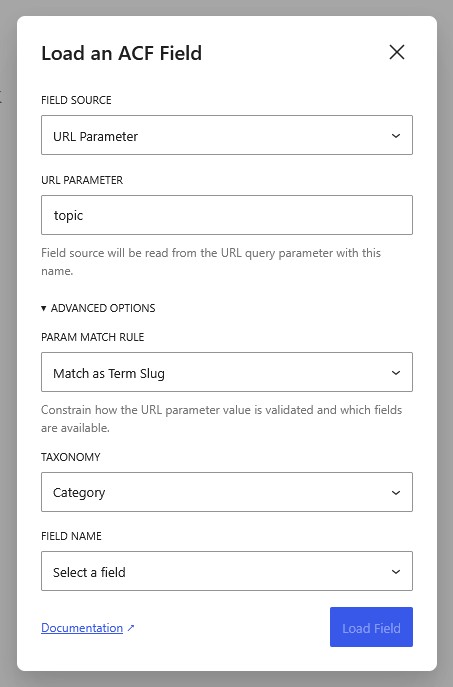
The selected rule also affects the available field list. For example, when using a Post-based rule, the field picker will only show fields attached to the selected post type. User rules only show user fields, while term rules only show taxonomy fields.
Unlike other field sources, URL Parameter blocks do not preview real values inside the editor because the URL parameter only exists during frontend requests. Inside the editor, the block remains empty or shows a placeholder until viewed on the frontend.
This source is especially useful for:
- profile pages,
- dashboard-style layouts,
- comparison pages,
- dynamic landing pages,
- single-page applications,
- and reusable templates driven by URL-based content.