
The Group field support is available only in the PRO version and is designed to give you direct access to sub fields stored inside an ACF Group field, without requiring any special handling or custom code.
Unlike other field types, a Group field itself is not rendered as a single output. Instead, when a Group field is detected, the ACF Field block exposes all sub fields inside the group as selectable fields. This means you do not load the Group field as a container; you load and display its sub fields individually.
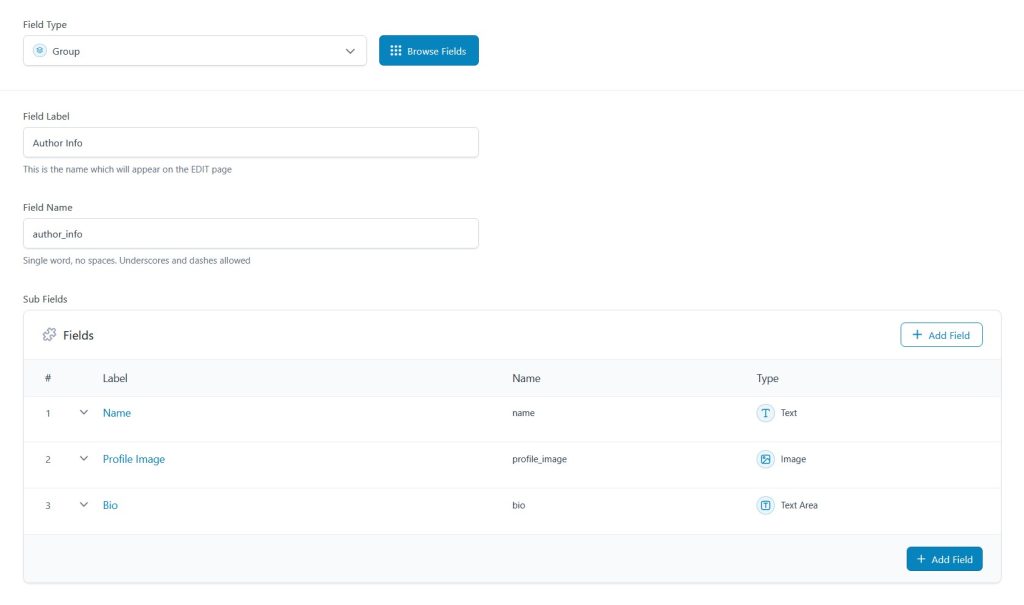
For example, if you have a Group field named “Author Info” that contains sub fields such as Name, Profile Image, and Bio, each of these sub fields will appear as separate, selectable options in the ACF Field block. You can then place and style each sub field anywhere in the block editor, just like regular ACF fields.

This approach keeps Group fields flexible and predictable, while allowing you to fully control layout and presentation. It is especially useful for structured data, such as profile sections, metadata panels, or grouped settings, where each sub field needs to be displayed independently rather than as a single combined output.